

At the start of this financial year, I set an intention: more facilitation, more in-person delivery and more of the work I love. What I didn’t plan for was how badly I’d need my own AI personal assistant to keep the rest of my life standing.
Well, be careful what you wish for.
This past month has been the busiest of my career. Criss-crossing Melbourne for in-person training sessions, delivering online corporate workshops on the side and facilitating Train the Trainer programs with factory teams. If it involved helping teams boost their productivity or get more from their systems, I probably did it this month. And it’s been brilliant.
But here’s the thing about running four to five different programs a week across completely different contexts and topics: the mental context-switching is heavy. The energy required to show up fully for every person goes fast. Really fast.
The Cost of Saying Yes to Everything
The professional win felt huge. But the personal fallout? That crept up quietly.
My house became chaotic. My balcony plants started giving me distress signals, with droopy leaves everywhere. The gym shifted from a regular habit to something I did when guilt finally kicked in. I was running on fumes, giving 100 percent in every facilitation session and zero percent to the rest of my life.
That’s when I realised something important: knowing your limits isn’t about being weak or not ambitious enough. It’s about being honest with yourself. Knowing your limits is a win, full stop.
Once you know them, you get to make a choice. You can’t be 100 percent in your career and 100 percent everywhere else. That’s not a failing. That’s maths.
Practising What I Preach
If you’re paying for premium AI tools — Copilot Premium, Claude Pro or paid subscriptions to any of the major platforms — you’re paying for an AI personal assistant. But most of us aren’t treating them like one.
We’re still using AI as though it’s a search engine. We ask questions and hope for good answers. That’s functional, sure. But if you’re drowning in admin, chaos and the mental load of trying to manage everything, you’re leaving money on the table.
The real power comes when you set up your AI tools to work for you. Configure them to understand what you need, remember your context and help automate the small decisions that consume your mental energy every day.
Think about your assistant at work, if you have one. You don’t expect them to read your mind. You brief them. You give them templates. You explain what you want the output to look like. You set them up to succeed.
Your AI personal assistant deserves the same treatment.
Setting Up Copilot as Your Personal Assistant
This is where it gets practical. Copilot Premium is already deeply integrated into your ecosystem if you use Outlook, Teams, Word or Excel. The leverage is already there; you just need to unlock it.
Here’s how to set up Copilot to act as your AI personal assistant:
- Create your ideal personal assistant prompt. This will look different for everyone.
- Run the prompt and review the response. It probably won’t be exactly what you need the first time, so keep revising it until it works for you.
- Adjust the brief. Use an example as a starting point, then change the timeframes and sections to suit your own week.
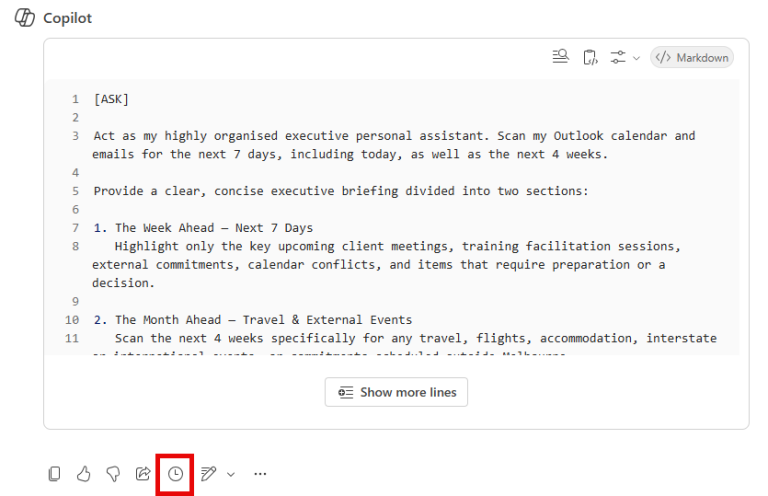
- Click the clock icon. Once you’re happy with your prompt, turn it into a scheduled prompt so you don’t have to run it manually every time.
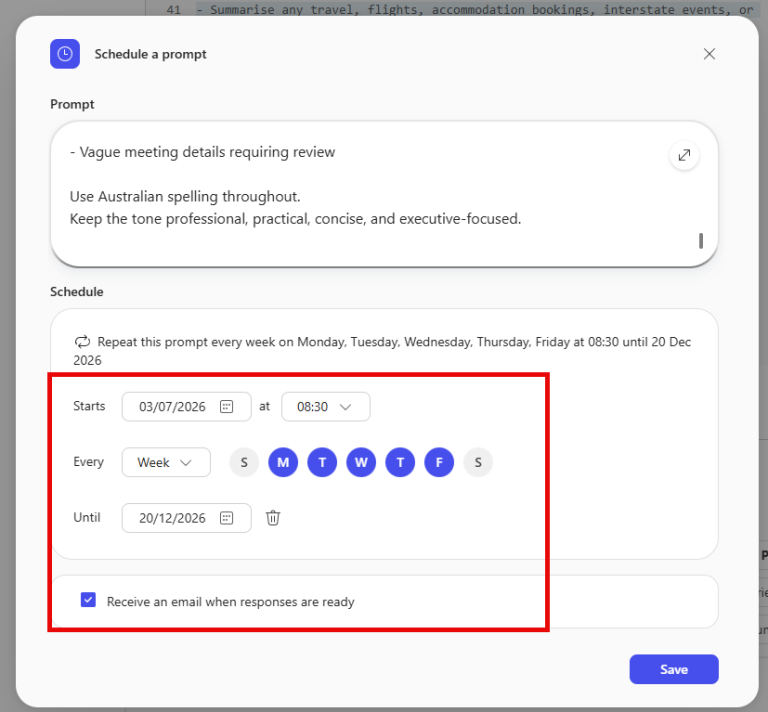
- Set your schedule. Choose whether the prompt runs daily, weekly or on specific days, then set the start and end dates. You can also request an email notification when the response is ready.
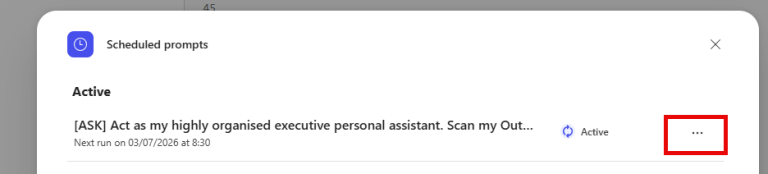
- Manage your scheduled prompts. Check when each prompt is next due to run, and edit or cancel it whenever your needs change.
The key is to be specific. Tell Copilot who you are, what you value and what success looks like. Then let it handle the execution.
The Claude and Codex Approach
If you’re paying for Claude Pro, you can install the Claude app on your computer and use Claude Cowork to schedule your own personal assistant prompt in much the same way you would with Copilot.
If you’re using ChatGPT, even on the free plan, you can try Codex, although you’ll likely need a paid plan to get the greatest benefit. Codex is also installed on your device, but this feature is called automations.
The main benefit of Claude and Codex over Copilot is that you’re not limited to the Microsoft ecosystem. My personal assistant prompt in Claude checks all my emails and calendars, including those outside Microsoft. If your life, like mine, operates across more than one ecosystem, this matters more than it might seem.
The Ripple Effect
Here’s what changed for me: once I acknowledged my limits, I could design systems to work around them. I could protect the energy I needed for facilitation by automating the administrative tasks that were draining energy everywhere else.
I started asking Claude to summarise meeting notes and extract the action items. I asked Copilot to draft first-pass responses to routine emails. I set up prompts to help me think through workshop design problems without starting from scratch every time.
Did this give me my gym routine back? Not completely. I’m still figuring that one out. But it did give me breathing room. It reduced the mental load enough for me to be more intentional about the other parts of my life.
So, What Now?
The lesson isn’t to work less or be less ambitious. It’s this: once you know your limits, you can be strategic about them.
If you’re already paying for premium AI, start treating it like the AI personal assistant you’re investing in. Brief it properly. Give it context. Build templates. Automate decisions.
And if you’re not using AI yet because it feels like one more thing to learn, consider the mental load you’re already carrying: the dishes, emails, meeting notes and draft responses. That’s the real cost. Learning to brief an AI properly is the shortcut.
Your limits aren’t weakness. They’re data. Use them.
About the Author
Nat Bell is the founder of Bell Training Solutions, providing consulting and training services that help organisations build practical, effective learning and development strategies. She supports leaders and teams with clear frameworks, policy guidance and capability development, helping turn training initiatives into meaningful behaviour change and practical outcomes. Nat also helps organisations develop policies that are understood, used and reinforced through effective training.
To contact Nat Bell, click here.